RCS Business API
The RCS Business API facilitates seamless integration of RCS messaging into your applications, enabling efficient and personalized customer communication. With rich features, it empowers businesses to engage effectively, provide timely updates, and offer responsive customer support on a trusted platform, strengthening connections with their audience.
Endpoint
Headers
- Name
contentType- Type
- string
- Description
This should be set to application/json.
- Name
apikey- Type
- string
- Description
Find your API key under your login account.
Plane Text
This endpoint is used to send an RCS (Rich Communication Services) message using a predefined campaign and template. The message is sent via a specified bot ID and can be targeted to a valid RCS-enabled phone number.
Required attributes
- Name
number- Type
- string
- Description
Recipient's phone number (must be RCS-enabled and in international format) For example, if the number is in the India, the format would be: +91XXXXXXXXXX
- Name
templateName- Type
- string
- Description
Name of the message template to be used.
- Name
botId- Type
- string
- Description
Identifier of the RCS bot used to send the message
Route Type
Use TRANS for Transactional type,
Use PROMO for Promotional type,
Optional attributes
- Name
campaignName- Type
- string
- Description
The RCS campaign name refers to the specific name or title given to a campaign conducted through RCS
Request
   curl -G - /v1/rcs\
  -H 'apikey':'string'
  -H "Content-Type: application/json" \
  -d '{
        "number":"+91XXXXXXXXXX",
        "campaignName": "api-test",
        "botId": "EXPOSE",
        "type": "TRANS",
        "templateName": "plane_text"
      }'
Response
{
    "id": "58d63c02-XXXX-XXXX-XXXX-XXXXbb39453",
    "data": [
    {
        "recipient": "+91XXXXXXXXXX",
        "messageId": "58d63c02-XXXXX-XXXXX-XXXXX-XXXX9bb39453:1"
    }],
    "totalCount": 1,
    "message": "Message Sent Successfully!",
    "error": null
    }
Rich Text
Rich Text in RCS refers to messages that go beyond simple plain text by allowing formatting and media enhancements such as: Buttons with actions.
Required attributes
- Name
number- Type
- string
- Description
Recipient's phone number (must be RCS-enabled and in international format) For example, if the number is in the India, the format would be: +91XXXXXXXXXX
- Name
templateName- Type
- string
- Description
Name of the message template to be used.
- Name
botId- Type
- string
- Description
Identifier of the RCS bot used to send the message
- Name
type- Type
- string
- Description
Route Type
Use TRANS for Transactional type,
Use PROMO for Promotional type,
Optional attributes
- Name
campaignName- Type
- string
- Description
The RCS campaign name refers to the specific name or title given to a campaign conducted through RCS
Request
   curl -G - /v1/rcs\
  -H 'apikey':'string'
  -H "Content-Type: application/json" \
  -d '{
        "number":"+91XXXXXXXXXX",
        "campaignName": "api-test",
        "botId": "EXPOSE",
        "type": "TRANS",
        "templateName": "rich_text"
      }'
Response
{
    "id": "58d63c02-XXXX-XXXX-XXXX-XXXXbb39453",
    "data": [
    {
        "recipient": "+91XXXXXXXXXX",
        "messageId": "58d63c02-XXXXX-XXXXX-XXXXX-XXXX9bb39453:1"
    }],
    "totalCount": 1,
    "message": "Message Sent Successfully!",
    "error": null
    }
Text with variables
This endpoint is for text templates with customizable parameters—simple integration, versatile customization.
Required attributes
- Name
from- Type
- string
- Description
Recipient's phone number (must be RCS-enabled and in international format) For example, if the number is in the India, the format would be: +91XXXXXXXXXX
- Name
templateName- Type
- string
- Description
Name of the message template to be used.
- Name
botId- Type
- string
- Description
Identifier of the RCS bot used to send the message
- Name
type- Type
- string
- Description
Route Type
Use TRANS for Transactional type,
Use PROMO for Promotional type,
- Name
content- Type
- array
- Description
To build a message content object for RCS, typically include various fields such as param, fileUrl( images, video, and other media).
- Name
params- Type
- string
- Description
If you have a registered template with placeholders and you need to submit parameter values in the same order as in the template, you can represent this as an array of values. Ensure that the values are not null, and if the template was registered without placeholders, you can submit an empty array.
Optional attributes
- Name
campaignName- Type
- string
- Description
The RCS campaign name refers to the specific name or title given to a campaign conducted through WhatsApp
Request
    curl -G - /v1/rcs\
   -H 'apikey':'string'
   -H "Content-Type: application/json" \
   -d '{
         "campaignName": "rcs-api-sms",
         "botId": "EXPOSE",
         "type": "TRANS",
         "number": "+91XXXXXXXXXX",
         "templateName": "text_with_variables",
         "content": [
             {
                 "params": [
                     "Bussiness",
                      "API'\''s"
                 ]
             }
         ]
     }'
Response
{
  "id": "58d63c02-XXXX-XXXX-XXXX-XXXXbb39453",
  "data": [
  {
  "recipient": "+91XXXXXXXXXX",
  "messageId": "58d63c02-XXXXX-XXXXX-XXXXX-XXXX9bb39453:1"
  } ],
  "totalCount": 1,
  "message": "Message Sent Successfully!",
  "error": null
}
STANDALONE if don't want to change the image in the Template
Required attributes
- Name
number- Type
- string
- Description
Recipient's phone number (must be RCS-enabled and in international format) For example, if the number is in the India, the format would be: +91XXXXXXXXXX
- Name
templateName- Type
- string
- Description
Name of the message template to be used.
- Name
botId- Type
- string
- Description
Identifier of the RCS bot used to send the message
- Name
type- Type
- string
- Description
Route Type
Use TRANS for Transactional type,
Use PROMO for Promotional type,
Optional attributes
- Name
campaignName- Type
- string
- Description
The RCS campaign name refers to the specific name or title given to a campaign conducted through RCS
Request
   curl -G - /v1/rcs\
  -H 'apikey':'string'
  -H "Content-Type: application/json" \
  -d '{
        "number":"+91XXXXXXXXXX",
        "campaignName": "api-test",
        "botId": "EXPOSE",
        "type": "TRANS",
        "templateName": "standalone"
      }'
Response
{
    "id": "58d63c02-XXXX-XXXX-XXXX-XXXXbb39453",
    "data": [
    {
        "recipient": "+91XXXXXXXXXX",
        "messageId": "58d63c02-XXXXX-XXXXX-XXXXX-XXXX9bb39453:1"
    }],
    "totalCount": 1,
    "message": "Message Sent Successfully!",
    "error": null
    }
STANDALONE if want to change the image in the Template
This endpoint is for text templates with customizable parameters—simple integration, versatile customization.
Required attributes
- Name
from- Type
- string
- Description
Recipient's phone number (must be RCS-enabled and in international format) For example, if the number is in the India, the format would be: +91XXXXXXXXXX
- Name
templateName- Type
- string
- Description
Name of the message template to be used.
- Name
botId- Type
- string
- Description
Identifier of the RCS bot used to send the message
- Name
type- Type
- string
- Description
Route Type
Use TRANS for Transactional type,
Use PROMO for Promotional type,
- Name
content- Type
- array
- Description
To build a message content object for RCS, typically include various fields such as param, fileUrl( images, video, and other media).
- Name
fileUrl- Type
- string
- Description
Publicly accessible URL to the media file you want to send
Optional attributes
- Name
campaignName- Type
- string
- Description
The RCS campaign name refers to the specific name or title given to a campaign conducted through WhatsApp
Request
    curl -G - /v1/rcs\
   -H 'apikey':'string'
   -H "Content-Type: application/json" \
   -d '{
         "campaignName": "rcs-api-sms",
         "botId": "EXPOSE",
         "type": "TRANS",
         "number": "+91XXXXXXXXXX",
         "templateName": "standalone",
         "content": [
             {
               "fileUrl": "https://omni-whtaspp-media.s3.ap-south-1.amazonaws.com/uploads/1740046830337.jpg"
             }
         ]
     }'
Response
{
  "id": "58d63c02-XXXX-XXXX-XXXX-XXXXbb39453",
  "data": [
  {
  "recipient": "+91XXXXXXXXXX",
  "messageId": "58d63c02-XXXXX-XXXXX-XXXXX-XXXX9bb39453:1"
  } ],
  "totalCount": 1,
  "message": "Message Sent Successfully!",
  "error": null
}
CAROUSEL if want to change the image in the Template
This endpoint is for text templates with customizable parameters—simple integration, versatile customization.
Required attributes
- Name
from- Type
- string
- Description
Recipient's phone number (must be RCS-enabled and in international format) For example, if the number is in the India, the format would be: +91XXXXXXXXXX
- Name
templateName- Type
- string
- Description
Name of the message template to be used.
- Name
botId- Type
- string
- Description
Identifier of the RCS bot used to send the message
- Name
type- Type
- string
- Description
Route Type
Use TRANS for Transactional type,
Use PROMO for Promotional type,
- Name
content- Type
- array
- Description
To build a message content object for RCS, typically include various fields such as param, fileUrl( images, video, and other media).
- Name
fileUrl- Type
- string
- Description
Publicly accessible URL to the media file you want to send
Optional attributes
- Name
campaignName- Type
- string
- Description
The RCS campaign name refers to the specific name or title given to a campaign conducted through WhatsApp
Request
    curl -G - /v1/rcs\
   -H 'apikey':'string'
   -H "Content-Type: application/json" \
   -d '{
         "campaignName": "rcs-api-sms",
         "botId": "EXPOSE",
         "type": "TRANS",
         "number": "+91XXXXXXXXXX",
         "templateName": "carousel_with_chips&buttons",
         "content": [
              {
                  "fileUrl": "https://omni-whtaspp-media.s3.ap-south-1.amazonaws.com/uploads/1740055635755.jpg"
              },
              {
                  "fileUrl": "https://omni-whtaspp-media.s3.ap-south-1.amazonaws.com/uploads/1740055635765.jpg"
                }
         ]
     }'
Response
{
  "id": "58d63c02-XXXX-XXXX-XXXX-XXXXbb39453",
  "data": [
  {
  "recipient": "+91XXXXXXXXXX",
  "messageId": "58d63c02-XXXXX-XXXXX-XXXXX-XXXX9bb39453:1"
  } ],
  "totalCount": 1,
  "message": "Message Sent Successfully!",
  "error": null
}
CAROUSEL if don't want to change the image in the Template
Required attributes
- Name
number- Type
- string
- Description
Recipient's phone number (must be RCS-enabled and in international format) For example, if the number is in the India, the format would be: +91XXXXXXXXXX
- Name
templateName- Type
- string
- Description
Name of the message template to be used.
- Name
botId- Type
- string
- Description
Identifier of the RCS bot used to send the message
- Name
type- Type
- string
- Description
Route Type
Use TRANS for Transactional type,
Use PROMO for Promotional type,
Optional attributes
- Name
campaignName- Type
- string
- Description
The RCS campaign name refers to the specific name or title given to a campaign conducted through RCS
Request
   curl -G - /v1/rcs\
  -H 'apikey':'string'
  -H "Content-Type: application/json" \
  -d '{
        "number":"+91XXXXXXXXXX",
        "campaignName": "api-test",
        "botId": "EXPOSE",
        "type": "TRANS",
        "templateName": "carousel_with_chips&buttons"
      }'
Response
{
    "id": "58d63c02-XXXX-XXXX-XXXX-XXXXbb39453",
    "data": [
    {
        "recipient": "+91XXXXXXXXXX",
        "messageId": "58d63c02-XXXXX-XXXXX-XXXXX-XXXX9bb39453:1"
    }],
    "totalCount": 1,
    "message": "Message Sent Successfully!",
    "error": null
    }
RCS Webhooks
RCS Webhooks allow your application to receive real-time callbacks whenever a user interacts with your RCS Business Agent or when the status of an outbound message changes.
To register a new webhook, configure a new webhook from the dashboard under RCS → Utility → Webhook. Give your webhook a name, choose the events you want to receive, and provide your callback URL.
How to add an RCS Webhook
- Click on RCS, then select Utility, and choose Webhook from the Dashboard.
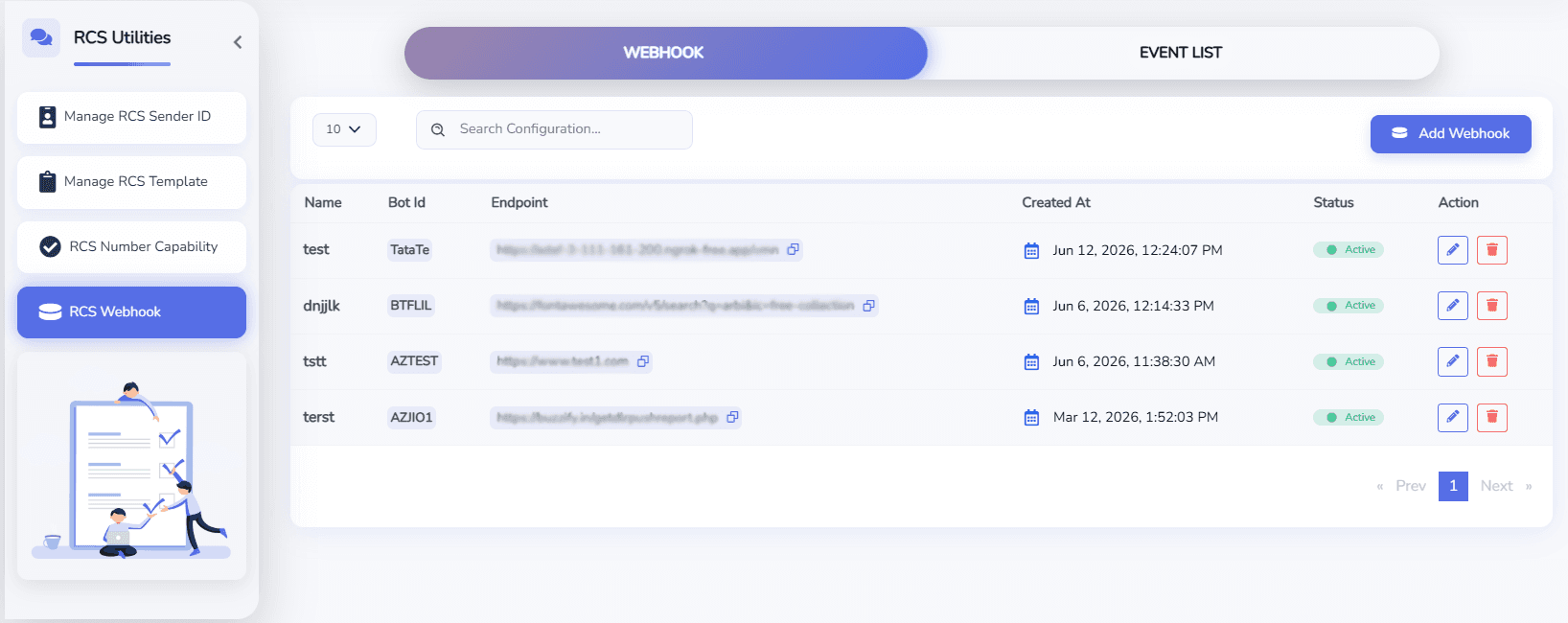
- Click Add Webhook.
- Enter the following details:
- Name – A unique name for the webhook.
- Method – HTTP Method (POST).
- End Point – Your publicly accessible webhook URL.
- Events – Select the RCS events that you want to receive.
- Click Add Webhook to save the configuration.
Sample Webhook Requests
The following examples show the webhook payloads that your application may receive.
Replace the webhook URL with your own endpoint.
User Text Message
curl -X POST "https://your-domain.com/rcs/webhook" \
-H "Content-Type: application/json" \
-d '{
  "botId":"Brand BotId",
  "channel":"rcs",
  "event":"user_message",
  "message":{
    "suggestionResponse":null,
    "text":"Reply",
    "userFile":null
  },
  "messageId":"880be396-0b83-4cc0-8b79-0a259daff1e5:1",
  "timestamp":1782471254312,
  "userPhoneNumber":"+919999999999"
}'
Action URL Callback
curl -X POST "https://your-domain.com/rcs/webhook" \
-H "Content-Type: application/json" \
-d '{
  "botId":"Brand BotId",
  "channel":"rcs",
  "event":"user_message",
  "message":{
    "suggestionResponse":{
      "plainText":"Button Label",
      "postBack":{
        "data":"Your postdata"
      },
      "type":"ACTION"
    },
    "text":"",
    "userFile":null
  },
  "messageId":"53282600-4563-4cf4-94c0-680895481b2b:1",
  "timestamp":1782471183264,
  "userPhoneNumber":"+919999999999"
}'
Reply Button Callback
curl -X POST "https://your-domain.com/rcs/webhook" \
-H "Content-Type: application/json" \
-d '{
  "botId":"Brand BotId",
  "channel":"rcs",
  "event":"user_message",
  "message":{
    "suggestionResponse":{
      "plainText":"Yes",
      "postBack":{
        "data":"YES_CLICKED"
      },
      "type":"REPLY"
    },
    "text":"",
    "userFile":null
  },
  "messageId":"6b4e01d2-5b26-48c9-b879-1efaf08c4b01:1",
  "timestamp":1782471254312,
  "userPhoneNumber":"+919999999999"
}'
Dialer Callback
curl -X POST "https://your-domain.com/rcs/webhook" \
-H "Content-Type: application/json" \
-d '{
  "botId":"Brand BotId",
  "channel":"rcs",
  "event":"user_message",
  "message":{
    "suggestionResponse":{
      "plainText":"Call Now",
      "postBack":{
        "data":"+911234567890"
      },
      "type":"DIALER"
    },
    "text":"",
    "userFile":null
  },
  "messageId":"f0a6f7b4-c7a4-4709-b9f8-04e46bcfd911:1",
  "timestamp":1782471254312,
  "userPhoneNumber":"+919999999999"
}'
Message Sent
curl -X POST "https://your-domain.com/rcs/webhook" \
  -H "Content-Type: application/json" \
  -d '{
    "botId": "Brand BotId",
    "channel": "rcs",
    "event": "message_status",
    "messageId": "d8f513e9-7a5d-4356-99cd-a3a54660691a:1",
    "statuses": {
      "eventId": "MxV08D0IpdSJe7w207IxOEOQ",
      "status": "sent",
      "timestamp": 1782471167
    }
  }'
Message Delivered
curl -X POST "https://your-domain.com/rcs/webhook" \
-H "Content-Type: application/json" \
-d '{
   "botId": "Brand BotId",
  "channel": "rcs",
  "event": "message_status",
  "messageId": "d8f513e9-7a5d-4356-99cd-a3a54660691a:1",
  "statuses": {
    "eventId": "MxV08D0IpdSJe7w207IxOEOQ",
    "status": "delivered",
    "timestamp": 1782471167
  }
}'
Message Read
curl -X POST "https://your-domain.com/rcs/webhook" \
-H "Content-Type: application/json" \
-d '{
 "botId": "Brand BotId",
  "channel": "rcs",
  "event": "message_status",
  "messageId": "d8f513e9-7a5d-4356-99cd-a3a54660691a:1",
  "statuses": {
    "eventId": "MxV08D0IpdSJe7w207IxOEOQ",
    "status": "read",
    "timestamp": 1782471167
  }
}'
Message Failed
curl -X POST "https://your-domain.com/rcs/webhook" \
  -H "Content-Type: application/json" \
  -d '{
     "botId": "Brand BotId",
  "channel": "rcs",
  "event": "message_status",
  "messageId": "d8f513e9-7a5d-4356-99cd-a3a54660691a:1",
  "statuses": {
    "eventId": "MxV08D0IpdSJe7w207IxOEOQ",
    "status": "failed",
    "timestamp": 1782471167
  }
  }'
Message Status Event
| Status | Description |
|---|---|
sent | The message has been accepted by the RCS platform and sent for delivery. |
delivered | The message has been successfully delivered to the recipient's device. |
read | The recipient has opened and read the message. |
failed | The message could not be delivered to the recipient. |
Event Descriptions
| Event | Description |
|---|---|
user_message | Triggered whenever a user sends a message or interacts with your RCS Business Agent. |
ACTION | User tapped an Action URL suggestion. |
REPLY | User selected a Reply Button suggestion. |
DIALER | User tapped a Call Button suggestion. |
text | User sent a text message. |
suggestionResponse | Contains the information about the suggestion button selected by the user. |
location | User shared their location. |
userFile | User uploaded a file, image, video, or audio attachment. |