WhatsApp Webhooks
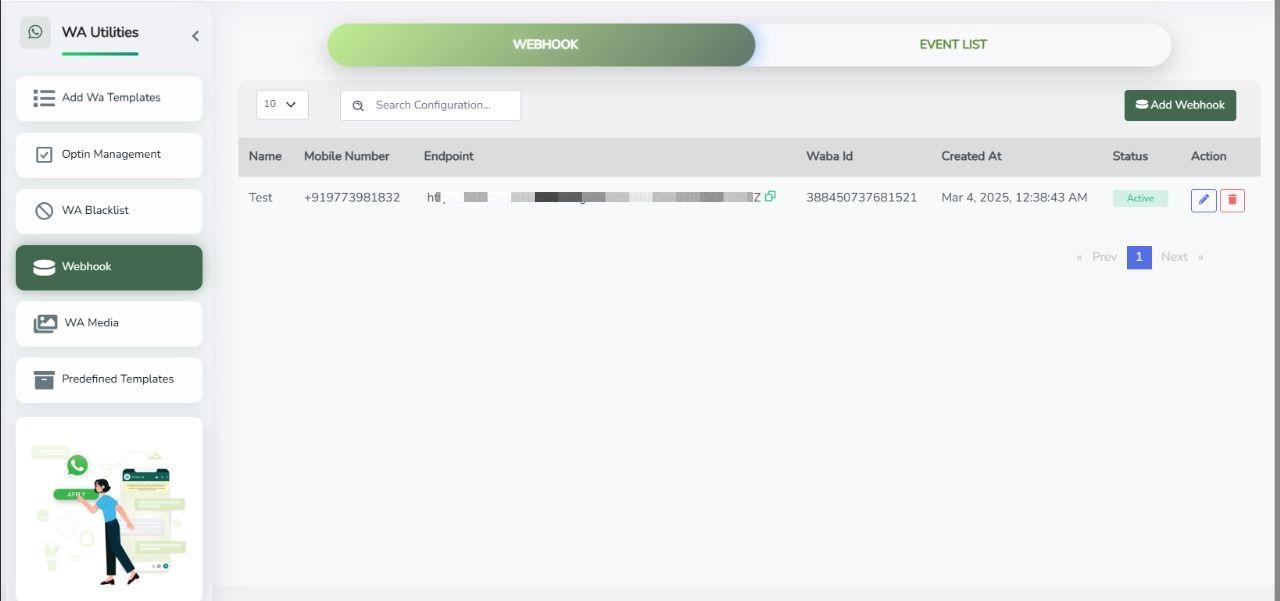
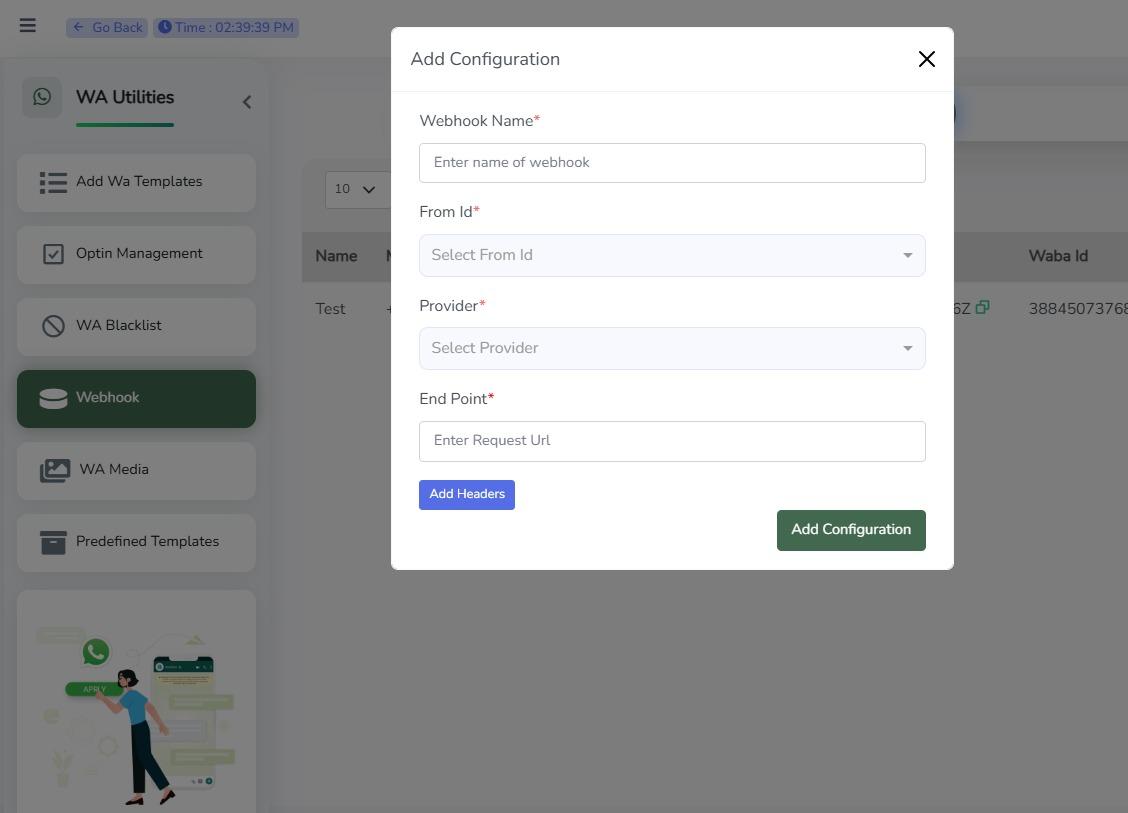
To register a new webhook, You can configure a new webhook from the dashboard under Whatsapp -> Wa Utility -> Webhook. Give your webhook a name, pick the events you want to listen for, and add your URL.
How To Add A WhatsApp Webhook
- Click on 'Whatsapp', then click on 'Wa Utility', and choose 'Webhook' on the Dashboard.
- Click on 'Add Webhook'.
Sample Webhook Requests
The following are sample webhook payloads that your application may receive. Replace the webhook URL with your own endpoint.
1. Message Delivered
curl -X POST "https://your-domain.com/webhook" \
  -H "Content-Type: application/json" \
  -d '{
    "channel": "whatsapp",
    "event": "message_status",
    "from": "FROM_PHONE_NUMBER",
    "messageId": "MESSAGE_ID",
    "statuses": {
      "conversationId": "CONVERSATION_ID",
      "entryId": "ENTRY_ID",
      "status": "delivered",
      "timestamp": "TIMESTAMP",
      "category": "marketing"
    }
  }'
2. Message Failed
curl -X POST "https://your-domain.com/webhook" \
  -H "Content-Type: application/json" \
  -d '{
    "channel": "whatsapp",
    "event": "message_status",
    "from": "FROM_PHONE_NUMBER",
    "messageId": "MESSAGE_ID",
    "statuses": {
      "conversationId": "CONVERSATION_ID",
      "entryId": "ENTRY_ID",
      "status": "failed",
      "error": {
        "code": 131049,
        "title": "This message was not delivered to maintain healthy ecosystem engagement."
      },
      "timestamp": "TIMESTAMP",
      "category": "marketing"
    }
  }'
3. Button Reply Received
curl -X POST "https://your-domain.com/webhook" \
  -H "Content-Type: application/json" \
  -d '{
    "channel": "whatsapp",
    "event": "message_received",
    "contacts": {
      "profileName": "USER_PROFILE_NAME",
      "recipient": "USER_NUMBER"
    },
    "from": "FROM_PHONE_NUMBER",
    "messageId": "MESSAGE_ID",
    "messages": {
      "type": "button",
      "button": {
        "payload": "Team Work",
        "text": "Team Work"
      },
      "timestamp": "TIMESTAMP"
    }
  }'
4. Interactive List Reply
curl -X POST "https://your-domain.com/webhook" \
  -H "Content-Type: application/json" \
  -d '{
    "channel": "whatsapp",
    "event": "message_received",
    "contacts": {
      "profileName": "USER_PROFILE_NAME",
      "recipient": "USER_NUMBER"
    },
    "from": "FROM_PHONE_NUMBER",
    "messageId": "MESSAGE_ID",
    "messages": {
      "type": "interactive",
      "interactive": {
        "type": "list_reply",
        "list_reply": {
          "id": "afad99ea",
          "title": "list_reply_message"
        }
      },
      "timestamp": "TIMESTAMP"
    }
  }'
5. Location Message
curl -X POST "https://your-domain.com/webhook" \
  -H "Content-Type: application/json" \
  -d '{
    "channel": "whatsapp",
    "event": "message_received",
    "contacts": {
      "profileName": "USER_PROFILE_NAME",
      "recipient": "USER_NUMBER"
    },
    "from": "FROM_PHONE_NUMBER",
    "messageId": "MESSAGE_ID",
    "messages": {
      "type": "location",
      "location": {
        "latitude": 28.510236740112,
        "longitude": 77.380279541016,
        "name": "Sample Location",
        "address": "Sector 62, Noida"
      },
      "timestamp": "TIMESTAMP"
    }
  }'
6. Text Message
curl -X POST "https://your-domain.com/webhook" \
  -H "Content-Type: application/json" \
  -d '{
    "channel": "whatsapp",
    "event": "message_received",
    "contacts": {
      "profileName": "USER_PROFILE_NAME",
      "recipient": "USER_NUMBER"
    },
    "from": "FROM_PHONE_NUMBER",
    "messageId": "MESSAGE_ID",
    "messages": {
      "type": "text",
      "text": {
        "body": "Hello! I would like more information."
      },
      "timestamp": "TIMESTAMP"
    }
  }'
7. Image Message
curl -X POST "https://your-domain.com/webhook" \
  -H "Content-Type: application/json" \
  -d '{
    "channel": "whatsapp",
    "event": "message_received",
    "contacts": {
      "profileName": "USER_PROFILE_NAME",
      "recipient": "USER_NUMBER"
    },
    "from": "FROM_PHONE_NUMBER",
    "messageId": "MESSAGE_ID",
    "messages": {
      "type": "image",
      "image": {
        "url": "https://example.com/images/sample.jpg",
        "caption": "Product Image"
      },
      "timestamp": "TIMESTAMP"
    }
  }'
8. Document Message
curl -X POST "https://your-domain.com/webhook" \
  -H "Content-Type: application/json" \
  -d '{
    "channel": "whatsapp",
    "event": "message_received",
    "contacts": {
      "profileName": "USER_PROFILE_NAME",
      "recipient": "USER_NUMBER"
    },
    "from": "FROM_PHONE_NUMBER",
    "messageId": "MESSAGE_ID",
    "messages": {
      "type": "document",
      "document": {
        "url": "https://example.com/files/invoice.pdf",
        "filename": "invoice.pdf"
      },
      "timestamp": "TIMESTAMP"
    }
  }'
9. Video Message
curl -X POST "https://your-domain.com/webhook" \
  -H "Content-Type: application/json" \
  -d '{
    "channel": "whatsapp",
    "event": "message_received",
    "contacts": {
      "profileName": "USER_PROFILE_NAME",
      "recipient": "USER_NUMBER"
    },
    "from": "FROM_PHONE_NUMBER",
    "messageId": "MESSAGE_ID",
    "messages": {
      "type": "video",
      "video": {
        "url": "https://example.com/videos/sample.mp4"
      },
      "timestamp": "TIMESTAMP"
    }
  }'
10. Audio Message
curl -X POST "https://your-domain.com/webhook" \
  -H "Content-Type: application/json" \
  -d '{
    "channel": "whatsapp",
    "event": "message_received",
    "contacts": {
      "profileName": "USER_PROFILE_NAME",
      "recipient": "USER_NUMBER"
    },
    "from": "FROM_PHONE_NUMBER",
    "messageId": "MESSAGE_ID",
    "messages": {
      "type": "audio",
      "audio": {
        "url": "https://example.com/audio/sample.mp3"
      },
      "timestamp": "TIMESTAMP"
    }
  }'
11. Contact Message
curl -X POST "https://your-domain.com/webhook" \
  -H "Content-Type: application/json" \
  -d '{
    "channel": "whatsapp",
    "event": "message_received",
    "contacts": {
      "profileName": "USER_PROFILE_NAME",
      "recipient": "USER_NUMBER"
    },
    "from": "FROM_PHONE_NUMBER",
    "messageId": "MESSAGE_ID",
    "messages": {
      "type": "contacts",
      "contacts": [
        {
          "name": {
            "formatted_name": "John Doe"
          },
          "phones": [
            {
              "phone": "+919876543210"
            }
          ]
        }
      ],
      "timestamp": "TIMESTAMP"
    }
  }'
Event Descriptions
| Event | Description |
|---|---|
message_status | Triggered whenever the status of a sent WhatsApp message changes (e.g. sent, delivered, read, failed). |
message_received | Triggered whenever your WhatsApp Business Account receives a message or an interactive reply from a user. |
button | Indicates that the user replied by clicking a reply button. |
interactive | Indicates that the user selected an option from an interactive list or flow. |
text | Indicates that the user sent a plain text message. |
image | Indicates that the user sent an image. |
document | Indicates that the user sent a document. |
video | Indicates that the user sent a video. |
audio | Indicates that the user sent an audio message or voice note. |
location | Indicates that the user shared their current location. |
contacts | Indicates that the user shared one or more contacts. |